




















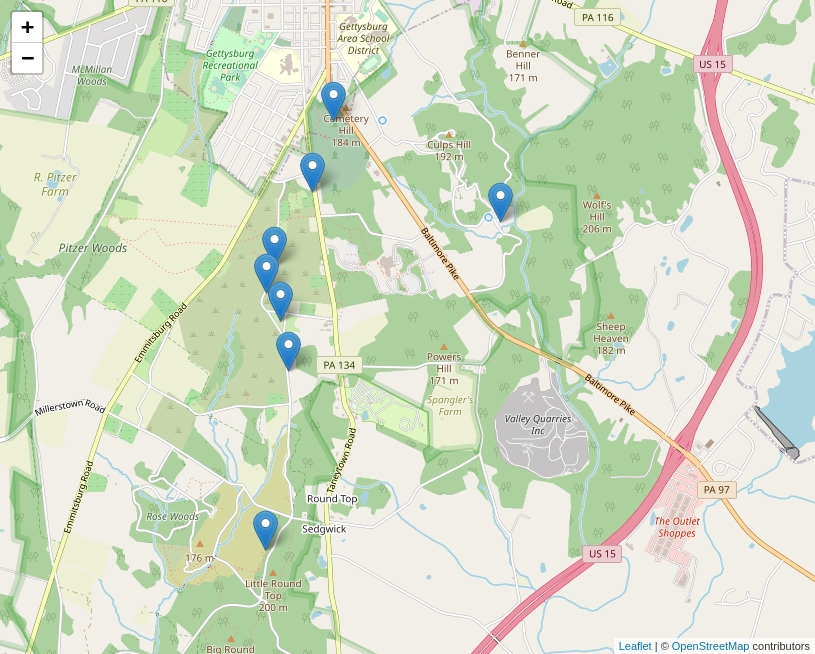
In my previous guide, I showed you how to add a Google Map to your website by using the Google Maps API. If you don’t want to use Google as your mapping engine then this guide is for you. In this guide, I will show you how to use OpenStreetMap as your mapping engine, which will not require you to set up an API Key. We will also be using leaflet.js to make things a whole lot easier.
Let’s Get Started
I will be using the same example as I did in the “Add a Google Map to Your Website” guide that I posted previously. A lot of this guide is going to look very similar except for the necessary changes that are needed.
Create an HTML Page
This is the basic HTML for setting up our website to include the Google Map. This template will display a map that has a height of 480px and a width of 640px. The #map ID within the style tag allows you to further adjust the styling of the map’s DIV container.
<!DOCTYPE html>
<html lang="en">
    <head>
        <meta charset="utf-8" />
        <meta name="viewport" content="width=device-width, initial-scale=1" />
        <style>
            body {
                margin: 0;
            }
            #map {
                width: 640px;
                height: 480px;
                background-color: grey;
            }
        </style>
        <title>My First OpenStreetMap</title>
   </head>

   <body>

        <div id="map"></div>

   </body>
</html>
Add the Leaflet Library
The Leaflet library is the leading open-source JavaScript library for mobile-friendly interactive maps. Weighing just about 39 KB of JS, it has all the mapping features most developers ever need. It is designed with simplicity, performance, and usability in mind. It works efficiently across all major desktop and mobile platforms, can be extended with lots of plugins, has a beautiful, easy-to-use, and well-documented API.
Now that we have our basic HTML setup, we will need to modify it to add a call to the leaflet.css file in our header.
<link rel="stylesheet" href="https://unpkg.com/[email protected]/dist/leaflet.css" />
We will also need to add a call to the leaflet.js file to the body of our HTML structure underneath our #map DIV tag.
<script src="https://unpkg.com/[email protected]/dist/leaflet.js"></script>
Below is what our new HTML structure should look like.
<!DOCTYPE html>
<html lang="en">
    <head>
        <meta charset="utf-8" />
        <meta name="viewport" content="width=device-width, initial-scale=1" />
        <link rel="stylesheet" href="https://unpkg.com/[email protected]/dist/leaflet.css" />
        <style>
            body {
                margin: 0;
            }
            #map {
                width: 640px;
                height: 480px;
                background-color: grey;
            }
        </style>
        <title>My First OpenStreetMap</title>
   </head>

   <body>

        <div id="map"></div>

        <script src="https://unpkg.com/[email protected]/dist/leaflet.js"></script>

   </body>
</html>
Adding the Callback
The only thing left before we can display the map is to initiate the callback. This is one of the most important pieces of our project. It not only displays the map, but also allows us to define our starting coordinates, markers, and additional options.
var map;

function initMap() {
    map = L.map( 'map', {
        center: [ 39.807305, -77.224207 ],
        zoom: 13
    });

    L.tileLayer( 'https://{s}.tile.openstreetmap.org/{z}/{x}/{y}.png', {
        attribution: '© <a href="https://www.openstreetmap.org/copyright">OpenStreetMap</a> contributors'
    }).addTo( map );
}
The above callback function will display a basic hybrid map with no markers on your page. The center option will center the map to the latitude and longitude coordinates. You can adjust how far or how close you want to view the map with the zoom option. The smaller the zoom number, the further out the zoom level is, and the larger the zoom number, the closer the zoom level is.
We are also going to modify the body tag and use it to initialize the map once the page has loaded.
<body onload="initMap()">
How good is a map without markers? A map without markers isn’t very useful. We use markers to show places of interest on a map. In the following function, we are going to be defining several points of interest and generate a marker for each interest on the map.
function create_markers() {
    var markers = [
        ["Delaware State Monument", "39.8161", "-77.23247"],
        ["Indiana State Monument", "39.814138", "-77.216287"],
        ["New York State Monument", "39.8208", "-77.2306"],
        ["New York Auxiliary State Monument", "39.8043", "-77.23445"],
        ["Pennsylvania State Memorial", "39.807588", "-77.235153"],
        ["United States Regulars Monument", "39.811217", "-77.235683"],
        ["United States Signal Corps Marker", "39.79254", "-77.236503"],
        ["Vermont State Monument", "39.80945", "-77.23636"],
    ];

    for ( var i = 0; i < markers.length; i++ ) {
        marker = new L.marker( [ markers[i][1], markers[i][2] ] )
            .bindPopup( markers[i][0] )
            .addTo( map );
    }
}
The above function will iterate through a list called markers and create a marker on the map for each item in the list. The first element in each sub-list is the content that will be displayed in an info window when the marker is clicked. The second and third elements in each sub-list are the latitude and longitude for the location.
In order to use the create_markers function, we will need to call it from the initMap function. This will allow the base map to load and then the markers.
function initMap() {
    map = L.map( 'map', {
        center: [ 39.807305, -77.224207 ],
        zoom: 13
    });

    L.tileLayer( 'https://{s}.tile.openstreetmap.org/{z}/{x}/{y}.png', {
        attribution: '© <a href="https://www.openstreetmap.org/copyright">OpenStreetMap</a> contributors'
    }).addTo( map );

    create_markers();
}
Our Final Project
We have gone through each piece of code and it’s now time to put it all together.
<!DOCTYPE html>
<html lang="en">
    <head>
        <meta charset="utf-8" />
        <meta name="viewport" content="width=device-width, initial-scale=1" />
        <link rel="stylesheet" href="https://unpkg.com/[email protected]/dist/leaflet.css" />
        <style>
            body {
                margin: 0;
            }
            #map {
                width: 640px;
                height: 480px;
                background-color: grey;
            }
        </style>
        <title>My First OpenStreetMap</title>
   </head>

   <body onload="initMap()">

        <div id="map"></div>

        <script>
            var map;

            function create_markers() {
                var markers = [
                    ["Delaware State Monument", "39.8161", "-77.23247"],
                    ["Indiana State Monument", "39.814138", "-77.216287"],
                    ["New York State Monument", "39.8208", "-77.2306"],
                    ["New York Auxiliary State Monument", "39.8043", "-77.23445"],
                    ["Pennsylvania State Memorial", "39.807588", "-77.235153"],
                    ["United States Regulars Monument", "39.811217", "-77.235683"],
                    ["United States Signal Corps Marker", "39.79254", "-77.236503"],
                    ["Vermont State Monument", "39.80945", "-77.23636"],
                ];

                for ( var i = 0; i < markers.length; i++ ) {
                    marker = new L.marker( [ markers[i][1], markers[i][2] ] )
                        .bindPopup( markers[i][0] )
                        .addTo( map );
                }
            }

            function initMap() {
                map = L.map( 'map', {
                    center: [ 39.807305, -77.224207 ],
                    zoom: 13
                });

                L.tileLayer( 'https://{s}.tile.openstreetmap.org/{z}/{x}/{y}.png', {
                    attribution: '© <a href="https://www.openstreetmap.org/copyright">OpenStreetMap</a> contributors'
                }).addTo( map );

                create_markers();
            }
        </script>

        <script src="https://unpkg.com/[email protected]/dist/leaflet.js"></script>

   </body>
</html>
We have completed the guide for adding an OpenStreetMap to a website. If you have done everything correctly, your page should display a map similar to the one below.